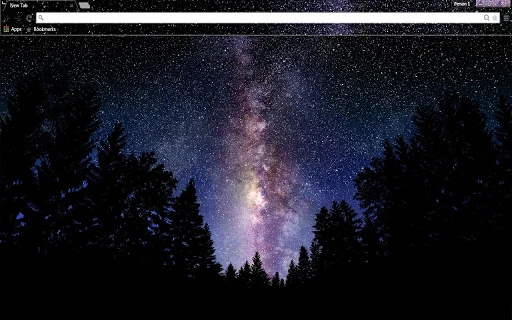
Screenshots
App details
- Version
- 1.3
- Size
- 3.65 MB
- Updated
- May 23, 2019
- Developer
- JamesB
- Category
- Extension
SoftPas in:
This product is also available in the following languages:
About Galaxy-View Theme for Chrome
Dark Mode Browser Theme Update
Overview
The software is designed to enhance the visual experience of web browsing by introducing a refined dark mode interface. With a focus on user customization, it allows users to modify the appearance of their browser through a dedicated theme system. The latest update, version 1.3, includes refinements to the name and bookmark bar, making these elements more visually distinct and easier to navigate. This tool is ideal for users seeking a more immersive and visually cohesive browsing environment, particularly those who prefer reduced screen glare and improved focus during extended sessions.
Target users include general consumers and professionals who spend significant time online and value a clean, modern interface. The software supports both Windows and Mac operating systems, making it accessible to a broad audience. Real-world usage scenarios include personal browsing, content creation, and remote work, where visual comfort and interface clarity are essential. The developer did not provide additional background information.
Key Features & Capabilities
- Dark Mode Interface – Transforms the browser’s default appearance into a sleek dark theme, reducing eye strain during nighttime or low-light use.
- Customizable Name and Bookmark Bar – Version 1.3 introduces enhanced visual styling for the name and bookmark bar, improving readability and aesthetic consistency.
- Interface Customization Tools – Offers users control over visual elements to align the browser’s look with personal preferences or workflow needs.
- Lightweight Design – With a file size of 2.1 MB, the software is optimized for minimal system impact, ensuring fast installation and low resource usage.
- Cross-Platform Compatibility – Functions seamlessly on both Windows and Mac, providing consistent performance across devices.
These features enable users to create a personalized browsing environment that supports productivity and visual comfort. For example, a content creator might use the dark theme to reduce visual fatigue during long editing sessions, while a remote worker could benefit from a cleaner interface that minimizes distractions.
User Interface, Workflow & Performance
The user interface is minimal and focused on visual clarity, aligning with modern design principles. Navigation is straightforward, with the theme settings accessible through a dedicated menu or configuration panel. The workflow is efficient, allowing users to apply changes with minimal steps, ideal for those who prioritize speed and simplicity.
Performance observations are based on general software behavior patterns. The developer did not specify resource usage details, and exact CPU or RAM behavior was not provided. However, the software’s lightweight footprint suggests it operates efficiently without significant system overhead. Stability appears consistent with standard desktop utilities, though real-world testing data was not included.
Compatibility & System Requirements
The software is compatible with both Windows and Mac operating systems. Version 1.3 is the current release, and the installation size is 2.1 MB. The developer did not specify additional hardware requirements or system specifications.
Exact system requirements were not listed. Compatibility information was partially provided, indicating support for major desktop platforms. Users should ensure their system meets general requirements for running desktop applications, though no specific benchmarks or configurations were shared.
Pros and Cons
Pros
- Lightweight at just 2.1 MB
- Easy-to-use customization for the name and bookmark bar
- Available for both Windows and Mac
- Free to download and use
- Enhances visual comfort with dark mode
Cons
- No detailed system requirements provided
- Developer background not disclosed
- Limited to visual customization—no functional browser enhancements
- No information on update frequency or automatic update features
- Performance metrics not available
Is this software safe to download and install?
The software is free and available for Windows and Mac. No security risks were reported in the provided information. As with any third-party application, users should ensure they download from official sources.
Does the software require an internet connection to function?
The software operates as a browser theme and does not require a continuous internet connection after installation. However, initial setup may involve online access for theme application.
Can I use this software offline?
Yes, once installed, the theme functions offline. The core customization features do not depend on an active internet connection.
What operating systems does it support?
The software supports both Windows and Mac operating systems. No further platform details were provided.
Is the license type free for personal and commercial use?
The software is listed as free to download and use. No restrictions on personal or commercial use were mentioned in the provided details.
Final Thoughts + CTA
This lightweight browser theme offers a simple yet effective way to improve the visual experience of web browsing. With its dark mode focus and refined interface elements in version 1.3, it delivers a modern, user-friendly update for those seeking a cleaner, more comfortable browsing environment. While it lacks advanced functionality beyond visual customization, its minimal footprint and cross-platform availability make it a practical choice for everyday users.
For individuals who value aesthetics, reduced eye strain, and a seamless interface, this tool provides a solid solution. The free pricing model enhances accessibility, and the straightforward setup ensures quick deployment. Overall, it’s a reliable utility for anyone looking to personalize their browser experience.
Download Browser Theme Dark Mode now
Guides & Tutorials
How to install Galaxy-View Theme for Chrome
- Click the Download button above.
- Once redirected, accept the terms and click Install.
- Wait for the Galaxy-View Theme for Chrome download to finish on your device.
How to use Galaxy-View Theme for Chrome
This software is primarily used for its core features described above. Open the app after installation to explore its capabilities.
User Reviews
No reviews yet. Be the first to share your experience.
You may also like
more
BannedList Highlighter Extension for Chrome
A Chrome extension that automatically highlights entries from John Rentoul's boo...

Bring It Back Extension for Chrome
It is an extension developed to revive the "Discuss" button which disappeared fr...

Clicky for Slack Extension for Chrome
#Clicky for Slack is the fastest and easiest way to share your current tab to an...

wrap Extension for Chrome
Reverting Tumblr’s awful design choices, one at a time. Up to date, despite old...

heriff_v2 Extension for Chrome
Before you install:1. $heriff is not intended for user under the age of 13.2. Fr...

Cards View' Filter for Trello Extension for Chrome
Adds buttons for filtering cards by list in Trello's Cards view.Changelog:1.0 (2...